We Rebuilt Mesh-LLM on ARM64 So the Mesh Could Actually Use the GPU
We rebuilt Mesh-LLM on ARM64 for CUDA, verified the runtime artifacts, brought a live node into a real mesh, and captured both the successful Qwen3-8B host path and the exact frontier-model failure that came after.
We Rebuilt Mesh-LLM on ARM64 So the Mesh Could Actually Use the GPU
Distributed inference is easy to demo and surprisingly easy to fake.
What we wanted was narrower and more useful: take one ARM64 machine with an NVIDIA GPU and turn it into a real Mesh-LLM node. Not “CUDA-supported” in theory. Not “accelerated” in a README. A node that was rebuilt correctly, verified locally, joined a live mesh, exposed the API surface we cared about, and successfully hosted a model under actual runtime pressure.
We pushed it past the happy path on purpose. The clean win was Qwen3-8B-Q4_K_M coming up end-to-end on the host path. The more interesting result came next: a frontier-model load that made it through host election, RPC startup, API handoff, and llama-server launch before failing on a missing multi-part GGUF shard.
That distinction is the whole point. It tells you the rebuild was real and the remaining problem was operational state, not pretend GPU support.
This is the technical version of that story: exact build path, exact verification points, live system images, and the failure that showed up after the demo-worthy part was already working.
What Mesh-LLM actually is
Mesh-LLM is built around a simple promise: pool spare GPU capacity across machines and expose the result as one OpenAI-compatible API.
That matters because it changes the default architecture. Instead of treating every machine like an isolated model host, the mesh becomes a shared inference surface:
- if a model fits on one machine, it runs there
- if it does not, the mesh can split work across nodes
- every node still exposes the same local OpenAI-compatible API shape
It is a strong abstraction, but only if the participating nodes are honest. A bad local build poisons the whole story.
The practical problem
The reason this rebuild mattered is simple: the initial install path on this ARM64 machine was not the GPU path.
The stock installer works, but on Linux/aarch64 it defaults to the cpu backend. That is fine if you just want a working local binary. It is not fine if the goal is to contribute real GPU capacity to a live mesh.
So the problem was not “how do we install Mesh-LLM?” The problem was: how do we turn a CPU-oriented install on ARM64 into a node that is actually built for CUDA?
We did not need another hand-wavy “GPU accelerated” claim. We needed a local node that was verifiably built for CUDA on this machine.
The live repo on this box is:
/home/ncubelabsai/mesh-llm-srcThe build script in that repo supports explicit Linux backends:
cpucudarocmvulkan
That distinction matters more than people admit. On unusual hardware, especially ARM64 systems, the gap between “the codebase supports CUDA” and “this machine is actually running the CUDA path” is the gap between a useful mesh participant and a disappointing one.
What we rebuilt
Instead of stopping at the default install, we cloned the repo locally and rebuilt the runtime for CUDA.
The source build path for Linux is straightforward:
cd /home/ncubelabsai/mesh-llm-src
just build backend=cuda cuda_arch='121'
The explicit script form is:
scripts/build-linux.sh --backend cuda --cuda-arch 121That build path configures the bundled llama.cpp backend for CUDA, sets the CUDA architecture explicitly, keeps RPC enabled, and then rebuilds the Rust mesh-llm binary around that stack.
That is the core transition in this story: from a default ARM64 install that was effectively CPU-oriented to a local build that could expose a real CUDA-backed runtime.
In the build script, the CUDA branch enables:
GGML_CUDA=ONGGML_CUDA_FA_ALL_QUANTS=ONCMAKE_CUDA_ARCHITECTURES=<arch>
And the shared build also enables:
GGML_RPC=ON
That is the real work: not a marketing layer, not a benchmark screenshot, but an actual rebuild of the inference substrate on the target machine.
What we verified on this machine
We verified both the llama.cpp build cache and the runtime artifacts it produced.
From the current build cache:
CMAKE_CUDA_ARCHITECTURES=121
GGML_CUDA=ON
GGML_CUDA_FA=ON
GGML_CUDA_FA_ALL_QUANTS=ON
GGML_RPC=ON
We also verified the timestamps of the rebuilt binaries:
2026-04-27 04:12:53 PDT  rpc-server
2026-04-27 04:14:04 PDT  llama-server
2026-04-27 04:16:43 PDT  target/release/mesh-llm
2026-04-27 04:17:35 PDT  ~/.local/bin/mesh-llm
We also verified that the installed binary matched the freshly built release binary.
That sounds basic, but it is one of the easiest places to fool yourself: rebuild one binary, run another, and walk away thinking the machine changed when it did not.
Runtime evidence from the live node
The goal was not to make pretty proof cards. The goal was to verify the node in motion.
GPU identity at runtime
The lowest-level runtime check still matters, but the useful signal is simple: this node resolves to NVIDIA GB10 on CUDA0 with stable PCI identity pci:0000000f:01:00.0.
That is enough to establish that the runtime sees a real local CUDA device. Everything more interesting happens after that.
OpenAI-compatible API responding on the live node
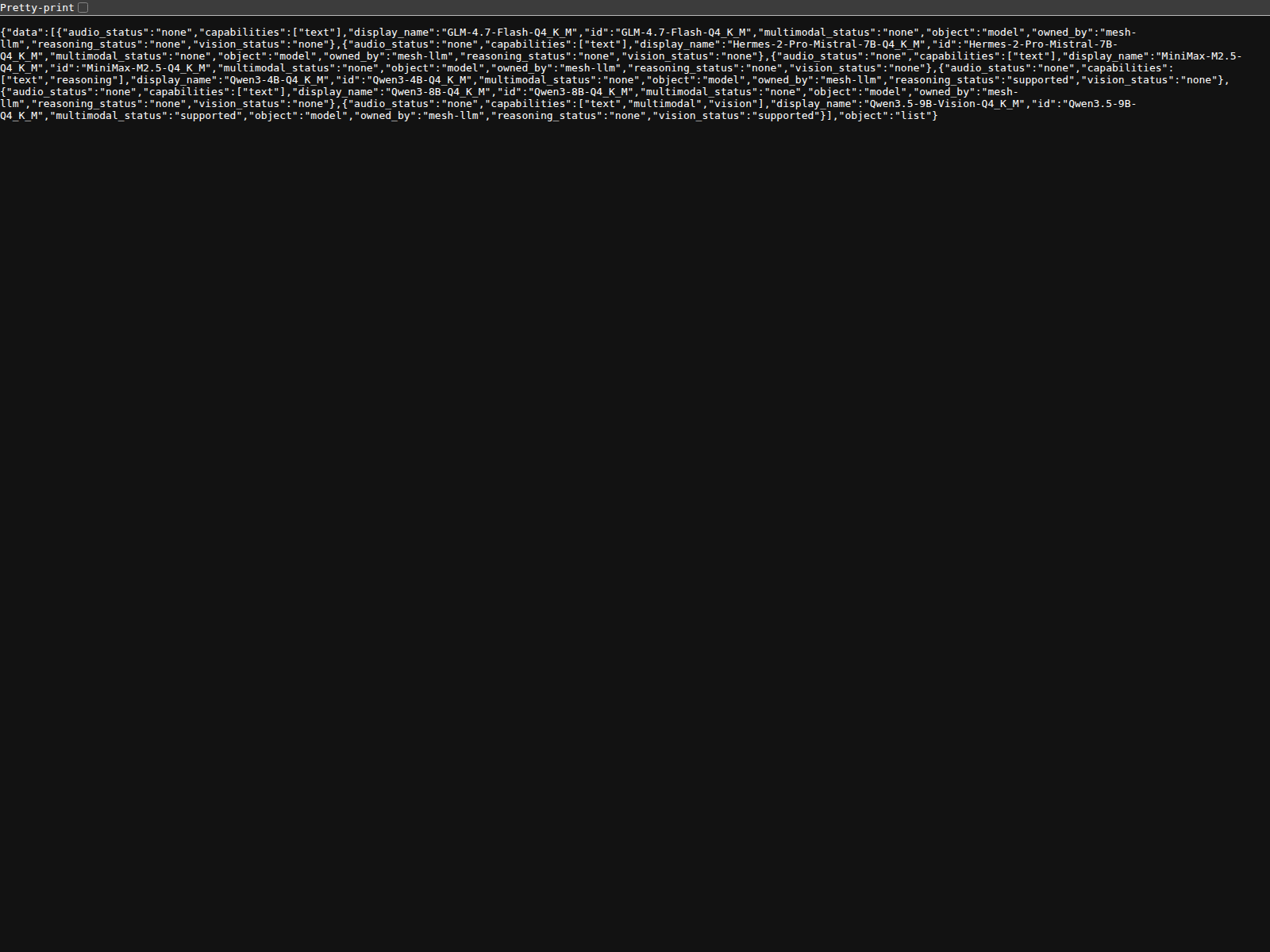
The second system surface that matters is the local API itself. On this machine, http://localhost:9337/v1/models returned a live catalog including Qwen3-8B-Q4_K_M, Qwen3-4B-Q4_K_M, GLM-4.7-Flash-Q4_K_M, Hermes-2-Pro-Mistral-7B-Q4_K_M, and Qwen3.5-9B-Q4_K_M.
That matters because the control-plane story is never enough. The endpoint has to answer with something real.
Successful host bring-up
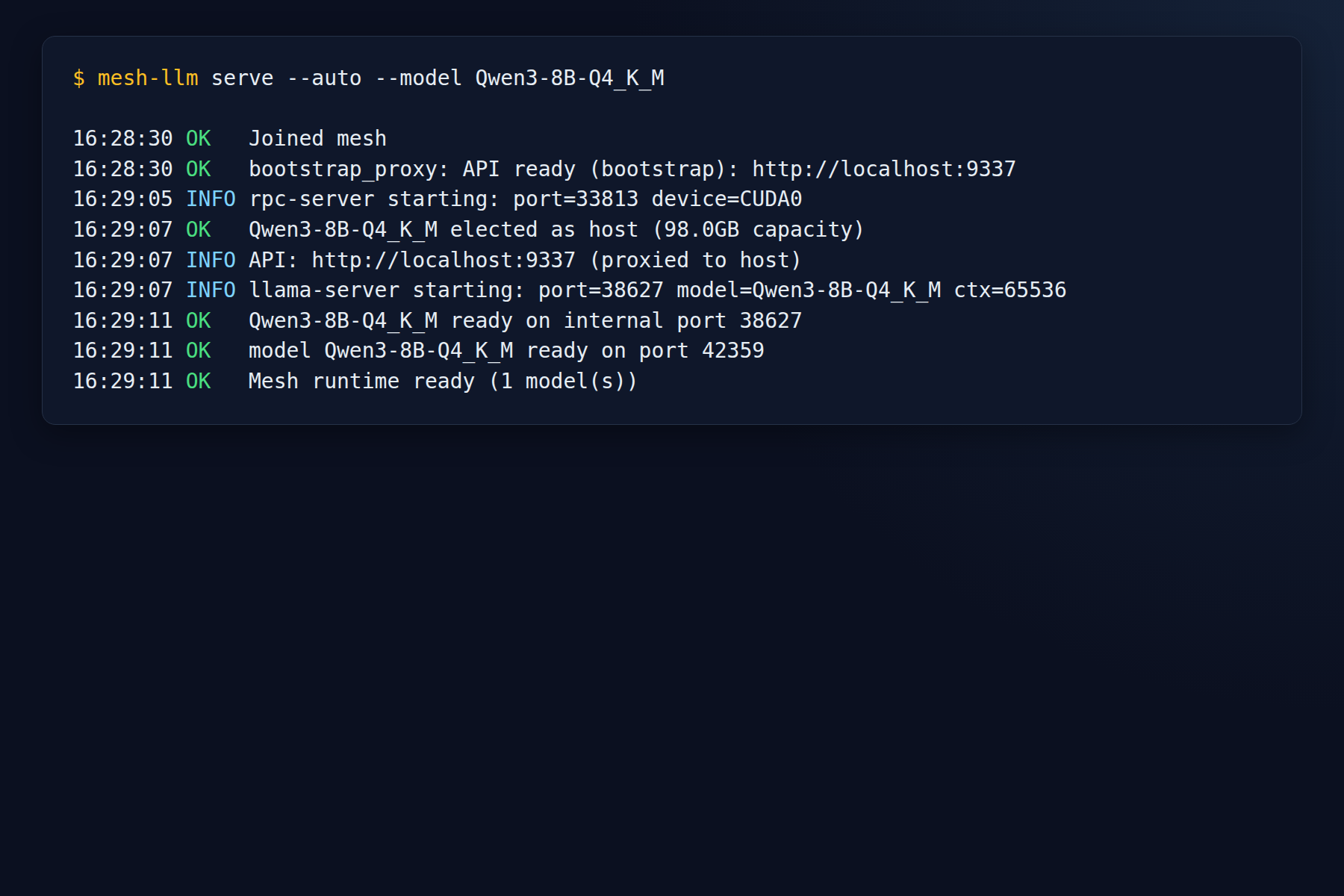
This is the image that best captures the claim of the post: joined mesh, bootstrap API up, rpc-server on CUDA0, host election for Qwen3-8B-Q4_K_M, llama-server launch, and a ready model on the local node.
That is the milestone that counts: not merely “compiled with CUDA,” but joined mesh + live API + host election + ready model.
Frontier-model failure that was still worth having
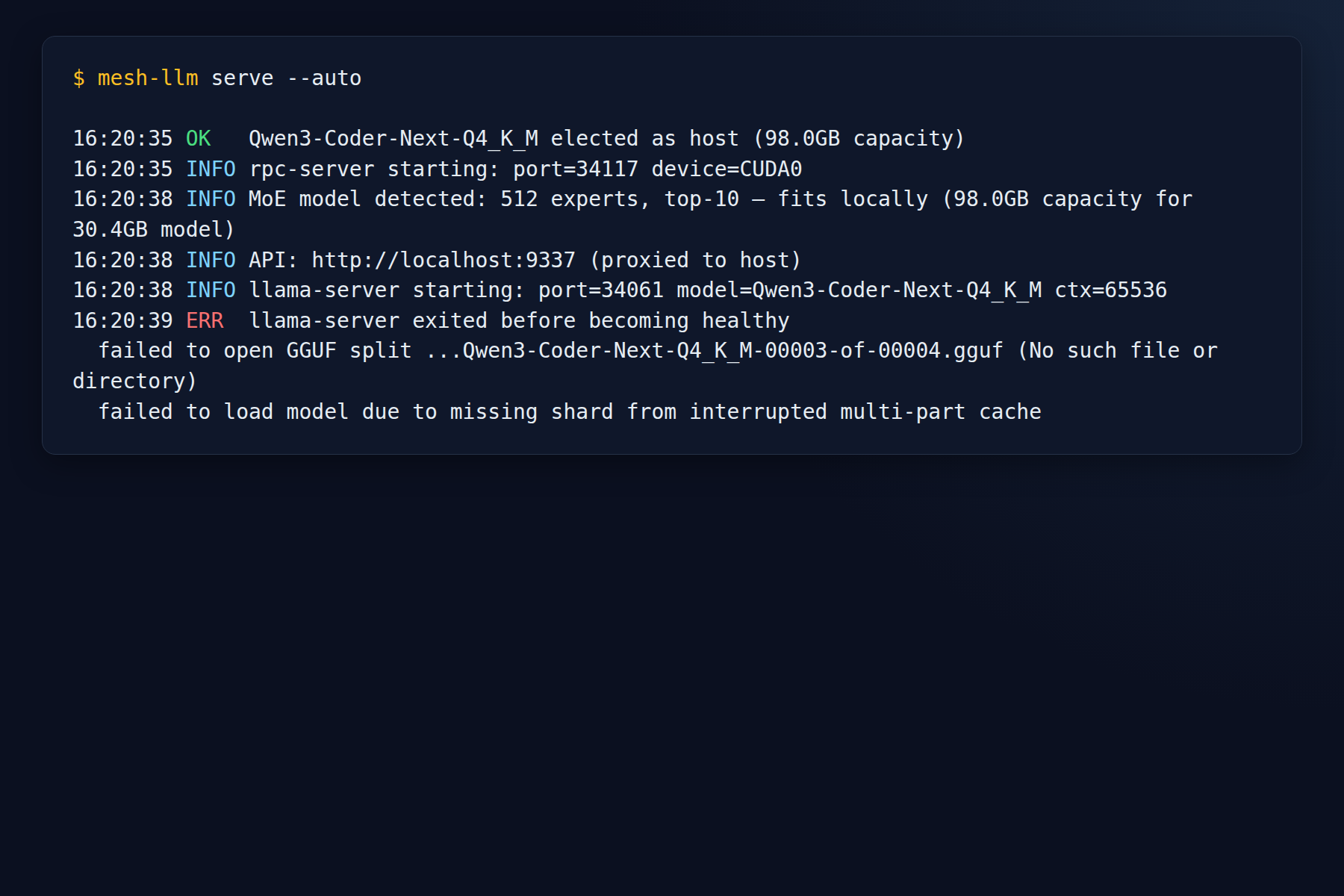
We also let the mesh elect this node for Qwen3-Coder-Next-Q4_K_M. That attempt got far enough to prove the GPU stack was not the problem.
The node had already made it through:
- mesh join
- bootstrap proxy
- RPC startup
- full API proxy
llama-serverlaunch- model load handoff
The failure was an interrupted multi-part Hugging Face cache, not a fake or broken CUDA rebuild.
Why this improves the mesh
A distributed inference system does not rescue a weak local node.
If the local machine is serving from the wrong backend, everything downstream gets worse:
- lower local throughput
- worse latency before the mesh even starts distributing work
- weaker single-node fallback behavior
- less useful GPU contribution to the rest of the pool
By rebuilding the local node correctly, we made that machine a better mesh participant.
That means:
- local requests start from a faster base
- the node contributes real GPU capacity to the mesh
- RPC-based distributed paths have a stronger local foundation
- the OpenAI-compatible endpoint is backed by a stack we actually trust
In other words: the mesh gets better when each node stops lying.
The part people skip: proof
We also checked the runtime GPU identity directly.
On this machine, mesh-llm gpus resolved the local device as an NVIDIA GB10 on CUDA0.
That is the kind of check you do before declaring victory. If you do not verify the built backend, the resulting binaries, and the runtime GPU identity, you are not operating a GPU-backed node. You are hoping.
The bigger lesson
What makes Mesh-LLM interesting is not just that it can spread inference across machines.
It gives you a cleaner way to think about inference infrastructure:
- make each node honest
- verify the hardware path locally
- expose one consistent API surface
- let the mesh decide how to use the pool
That is a better operational model than hand-wiring one-off model servers and hoping distributed behavior sorts itself out later.
Copy/paste rebuild checklist
If you are doing this on a similar machine, the shortest useful checklist is:
- Verify the repo and toolchain are local and current.
- Rebuild with the CUDA backend explicitly.
- Set the correct CUDA architecture for the machine.
- Confirm the build cache shows
GGML_CUDA=ONandGGML_RPC=ON. - Verify
rpc-server,llama-server, andmesh-llmwere actually rebuilt. - Verify the installed binary matches the fresh build.
- Run
mesh-llm gpusand confirm the runtime sees the real GPU.
If you skip any of those, you are leaving room for fake confidence.
Closing
The headline is not that we flipped a flag.
The headline is that we made the node real.
Mesh-LLM is compelling when it turns uneven hardware into a shared serving surface. But that only works when each participant is built and verified like production infrastructure.
That is what we did here: rebuild the stack for CUDA on ARM64, verify the artifacts, and turn this machine into a node the mesh can actually trust.